Lab 2: Environment Tour
This lab explains how FortiAIGate 8.0.2 works and where each setting lives. Every following lab touches one of the pieces described here, so a few minutes now make the rest of the workshop much faster.
🎯 Lab Objectives
In this lab, you will:
- Discover the FortiAIGate 8.0.2 architecture and the lab environment.
- Follow the path of a request through the gateway.
- Understand the resource model: organization, workspaces, projects and virtual keys.
- Understand the security model: detectors, guardrails and policies.
- Explore your Workspace portal.
🧭 Lab Architecture
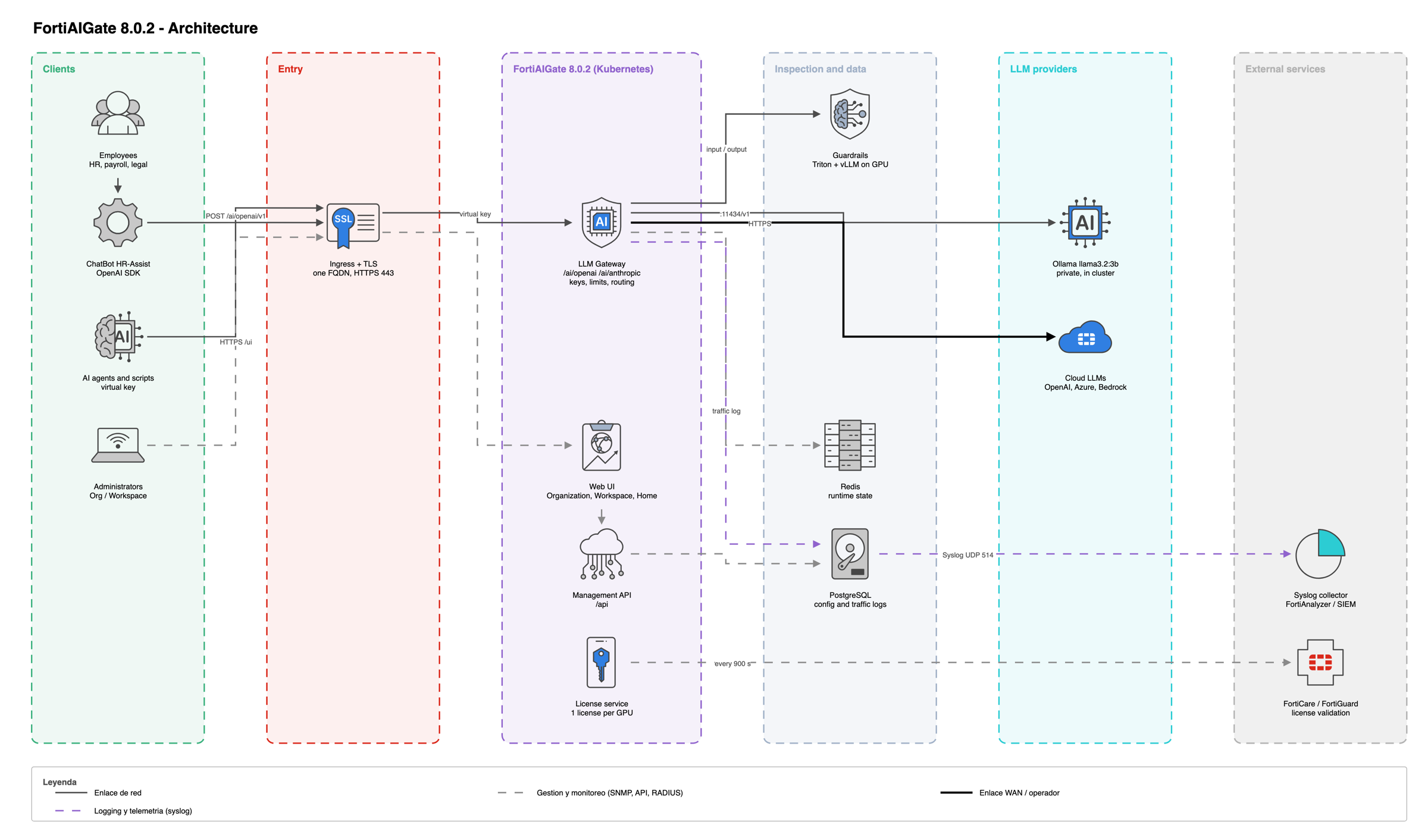
FortiAIGate is an enterprise AI gateway: a proxy between the applications and agents that use LLMs and the model providers. Production deployments run on Kubernetes with GPU inference engines for inspection. In this lab, FortiAIGate 8.0.2 runs on a single VM with Docker Compose (the Deployment Assistant), with the same services: gateway, web UI, API, guardrail scanners, license manager, log daemon, PostgreSQL and Redis.
| Component | What it does |
|---|---|
| Ingress + TLS | Publishes one HTTPS hostname, with a trusted certificate, for the web UI and the gateway. |
| LLM Gateway | Receives model requests, validates the virtual key, applies limits and routing, and calls the model. |
| Web UI | Three portals: Organization, Workspace and Home. |
| Guardrails | Run the detectors of the input and output guardrails on Triton and vLLM (GPU). |
| PostgreSQL / Redis | Dependency services with persistent storage; traffic logs are kept in the database. |
| License service | Validates GPU licenses with FortiCare every 15 minutes. |
| Log forwarding | Sends traffic and audit logs to an external Syslog collector over UDP. |
No GPU license, no inspection
FortiAIGate needs one valid license per physical GPU used by its inference engines. If a GPU is not covered, Security Scanning is disabled: requests still reach the model, but no guardrail runs. A normal answer from the model never proves that inspection works; only a blocked test request does.
1. Request Lifecycle
What happens to every request
Every request from the ChatBot goes through five controls:
| Step | Control | If it fails | Lab |
|---|---|---|---|
| 1 | Virtual key and model access | Request refused | Lab 3 |
| 2 | Budgets and rate limits | HTTP 402 budget_exceeded or 429 rate_limit_exceeded |
Lab 8 |
| 3 | Input guardrails | Blocked before reaching the model, or redacted | Labs 4–6 |
| 4 | Routing to the provider (model groups and fallback when configured) | The next model in the chain answers | — |
| 5 | Output guardrails (Post-stream or In-stream) |
Response blocked or redacted | Labs 5–6 |
After the response, FortiAIGate records the request in the Traffic Log with tokens, cost, verdict and findings.
2. Resource Model
Organization, workspaces, projects and virtual keys
| Object | What it is | Who manages it in this lab |
|---|---|---|
| Organization | Top-level boundary: users, AI providers, models, organization policies and total budget. | Instructor |
| Workspace | A team's boundary: receives models and credentials from the organization, has its own limits. | Instructor creates it; you administer it |
| Project | Optional group of keys for one application or agent, with its own models, budget and policies. | You |
| Virtual key | The credential an application uses to call the gateway. Service keys belong to apps, User keys to people. | You |
| Provider credential | The real key FortiAIGate uses to call the model provider. It never leaves the gateway. | Instructor |
A model can be used only if it is allowed at every level: organization, workspace, project and key. Limits work the same way: a request must satisfy every budget and rate limit that applies to it.
3. Security Model
Detectors, guardrails and policies
Security is built with three objects, always in this order:
- Detector — what to look for and what to do:
Block,RedactorAlert. - Guardrail — a group of detectors.
- Policy — which models are inspected, which guardrails run on input and output, and how responses are scanned.
| Detector type | Detects | Actions |
|---|---|---|
| Data Leak Protection | Credentials, card and bank data, IDs, names, contact details, health data. Threshold 0.70 by default. |
Block, Redact, Alert per entity |
| Regex | Exact patterns, one or more per rule. | Block, Redact, Alert per rule |
| Natural Language | Behavior described in plain text: Violate if and Exempt if. |
Block, Alert per detector |
| Governance | Predefined AI safety and regulatory rules. Read only; use Duplicate to edit. |
As defined |
- When several detectors match, the strongest action wins: Block, then Redact, then Alert.
- Policies set on the organization, workspace, project and key add up.
- Objects created inside a workspace go through approval:
Draft→Pending→Active.
| Response scan mode | How it works | Trade-off |
|---|---|---|
Post-stream |
Buffers the whole response, inspects it, then delivers it. | Full inspection; the first words arrive later. |
In-stream |
Inspects in windows and releases checked parts. | Faster for long answers; delivered text cannot be recalled. |
🔎 Lab Tasks
🛡️ Explore your Workspace portal
Sign in to FortiAIGate and open the Workspace portal of ws-studentXX.
Review the left menu:
ProjectsandVirtual KeysDetectors,Guardrails,PolicyandPlaygroundUsage,CostandAnalyticsLogs > Traffic Log
🤖 Review the models available to your workspace
Your instructor connected Ollama with its default model llama3.2:3b and allocated it to your workspace. It is the only model used in the labs.
| Public model name | Provider | Use in the labs |
|---|---|---|
llama3.2-3b |
ollama |
HR ChatBot model in every lab (Ollama model llama3.2:3b) |
The instructor defined this public name when adding the model. You will use it in the ChatBot.
🔌 Review the gateway endpoints
One gateway serves several API dialects. The ChatBot uses the OpenAI path.
| Client API | Path | Authentication |
|---|---|---|
| OpenAI Chat Completions | /ai/openai/v1/chat/completions |
Authorization: Bearer <virtual key> |
| OpenAI Responses | /ai/openai/v1/responses |
Authorization: Bearer <virtual key> |
| Anthropic Messages | /ai/anthropic/v1/messages |
x-api-key: <virtual key> |
| Gemini generateContent | /ai/gemini/v1beta/models/{model}:generateContent |
x-goog-api-key: <virtual key> |
| Cohere Chat | /ai/cohere/v2/chat |
Authorization: Bearer <virtual key> |
The OpenAI and Anthropic paths translate to any onboarded provider, so an application written for OpenAI can use the private Ollama model without code changes.
📘 Glossary
| Term | Meaning |
|---|---|
| AI Provider | Connection to a model platform, such as OpenAI, Azure AI Foundry, Bedrock or Ollama. |
| Public model name | The name applications use for a model, defined by the administrator, such as llama3.2-3b. |
| Virtual key | FortiAIGate credential for an application or a user; the secret is shown only once. |
| Security Scanning | License verdict that allows guardrails to run. |
| Model Group | One public name for a pool of models (production feature; not used in this lab). |
| Fallback | Ordered list of models to try when the primary fails (production feature; not used in this lab). |
| RPM / TPM | Requests and tokens per minute. |
| Traffic / Audit Log | Record of every request / of every administrative change. |
🏁 Conclusion
In this lab, you:
- Reviewed the FortiAIGate 8.0.2 architecture and the lab environment.
- Followed the five controls applied to every request.
- Learned the resource model and the security model.
- Explored your Workspace portal and the available models.
This foundation prepares you for the configuration labs.